
Managing content should not be a scavenger hunt across Google Drive, your inbox, and Notion.
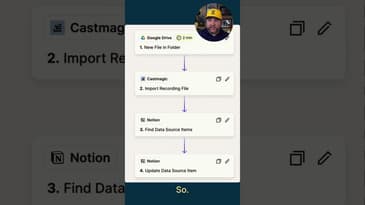
This automation solves that problem with 3 tools and 4 easy steps:
→ Google Drive as the trigger
→ Cast Magic for transcription + generating assets
→ Notion to track and update content status
Here’s how it works:
* You drop a file into a specific Google Drive folder.
* That automatically uploads the file to Cast Magic (which pulls the transcript, title ideas, descriptions, social posts—all the goodies).
* Then the automation searches your Notion database. As long as your Google Drive filename matches a filename in the database, it updates that entry to “Edited” or “Ready for Scheduling.”
* When something’s marked “Ready for Scheduling” in Notion, my VA gets an email. She never needs to guess. I don’t need to ask.
Now, when I make a video, that’s all I focus on—making the video. The rest just… happens.
A little complicated? Maybe.
A massive time-saver? Absolutely.
Try Notion if you haven't: https://joec.pro/notion
Hey, I'm Joe Casabona.
⏳ I talk a lot about automations and systems.
I help solopreneurs use tech to build better human interactions (not replace them).
⚙️ I also have a newsletter where I teach and build automations. Join using the blue link under my name.
~~~~~~~~~~~~~~~~~~~~~~~~
~~~~~~~~~~~~~~~~~~~~~~~~
Join my newsletter: https://casabona.org/join
Check out my podcast: https://streamlined.fm/
What's on my desk: https://casabona.org/desk
What I Use: https://casabona.org/uses
~~~~~~~~~~~~~~~~~~~~~~~~
~~~~~~~~~~~~~~~~~~~~~~~~